#debian

282 posts · Last used 1d

[$] Debian decides not to decide on AI-generated contributions Debian is the latest in an ever-growing list of projects to wrestle (again) with the question of LLM-generated contributions; the latest debate stared in mid-February, after Lucas [...] https://lwn.net/Articles/1061544/ #LWN #Linux #Debian #LLVM #Python
4
0
4
0
@freeopensource @howto @tutorial #ADBtutorial #scrcpyTutorial .. or #howTo get your cellphone onto your computer. A thread about the tool adb to access your android cellphone and become able to do all the stuff of your hand held computer from your desktop. You don't have to root your phone to be able to use #ADB, but you do have to switch developers mode on. You can do that in settings, depending on your android version, somewhere in a settings subfolder by tapping like ten times on the serial number (or something like that) of your phone. Next you have to open the "developer options" section that has appeared at the bottom of the settings section and enable "debugging with USB". ADB is also available on windows, perhaps MacOS, yet the info here is from the view point of a #linux #debian #desktop. Except a few details, things shouldn't be different for users of proprietary operating systems. How to install ADB and connect your phone to your computer | click to open/close To install ADB: apt get install adb Connect your phone with a USB cable to your desktop computer. Open the console of your computer and type or copy/paste: adb devices ADB will list you the TCP port it opens for the USB connection and the device (or devices) connected that it recognizes. The output will be something like this: :~$ adb devices List of devices attached 4xxxxxxxxxxxxd device Another necessary program for your desktop computer is scrcpy. This program allows you to project the screen of your cell phone onto your desktop screen if you have ADB installed. To install #scrcpy: apt get install scrcpy Important note about the scrcpy versions and compatibilityThis program is, from the coding point of view, in full development mode. To prevent to run into compatibility trouble with your installed ADB version, in particular when using ADB over WIFI, you should pull the scrcpy installation from the github page instead of installing the package of the debian package manager. The github page has links to SNAP versions as well as pull instructions. A recent intent of using a SNAP version here on KubuntuStudio created an incompatibility of versions too, so the best you can do is run the github instructions to pull the latest code from github. Here a copy of the actual (19-06-2024) instruction. github code to pull latest scrcpy from githubgithub.com/Genymobile/scrcpy/b… for Debian/Ubuntu First, you need to install the required packages: sudo apt install ffmpeg libsdl2-2.0-0 adb wget gcc git pkg-config meson ninja-build libsdl2-dev libavcodec-dev libavdevice-dev libavformat-dev libavutil-dev libswresample-dev libusb-1.0-0 libusb-1.0-0-dev Than clone the repo and execute the installation script: git clone https://github.com/Genymobile/scrcpy cd scrcpy ./install_release.sh When a new release is out, update the repo and reinstall: git pull ./install_release.sh To uninstall: sudo ninja -Cbuild-auto uninstall Detailed Information about scrcpy commands: github.com/Genymobile/scrcpy/t… To see and have access to your cell phone from your computer you have to first start adb and connect the cellphone and than type in the console: scrcpy .. voila ..

0
1
0
0
Replying to
@sven222@goto.hardwarepunk.de Meine Eltern haben mittlerweile #Debian statt #Windows. Bin mal gespannt ob mich da an Weihnachten auch böse Überraschungen erwarten. 🫣 Wenn ich nachfrage heißt es immer alles liefe gut, das stimmt mich zuversichtlich.
0
0
0
0
"AI" in open source (-)
50
5
14
0
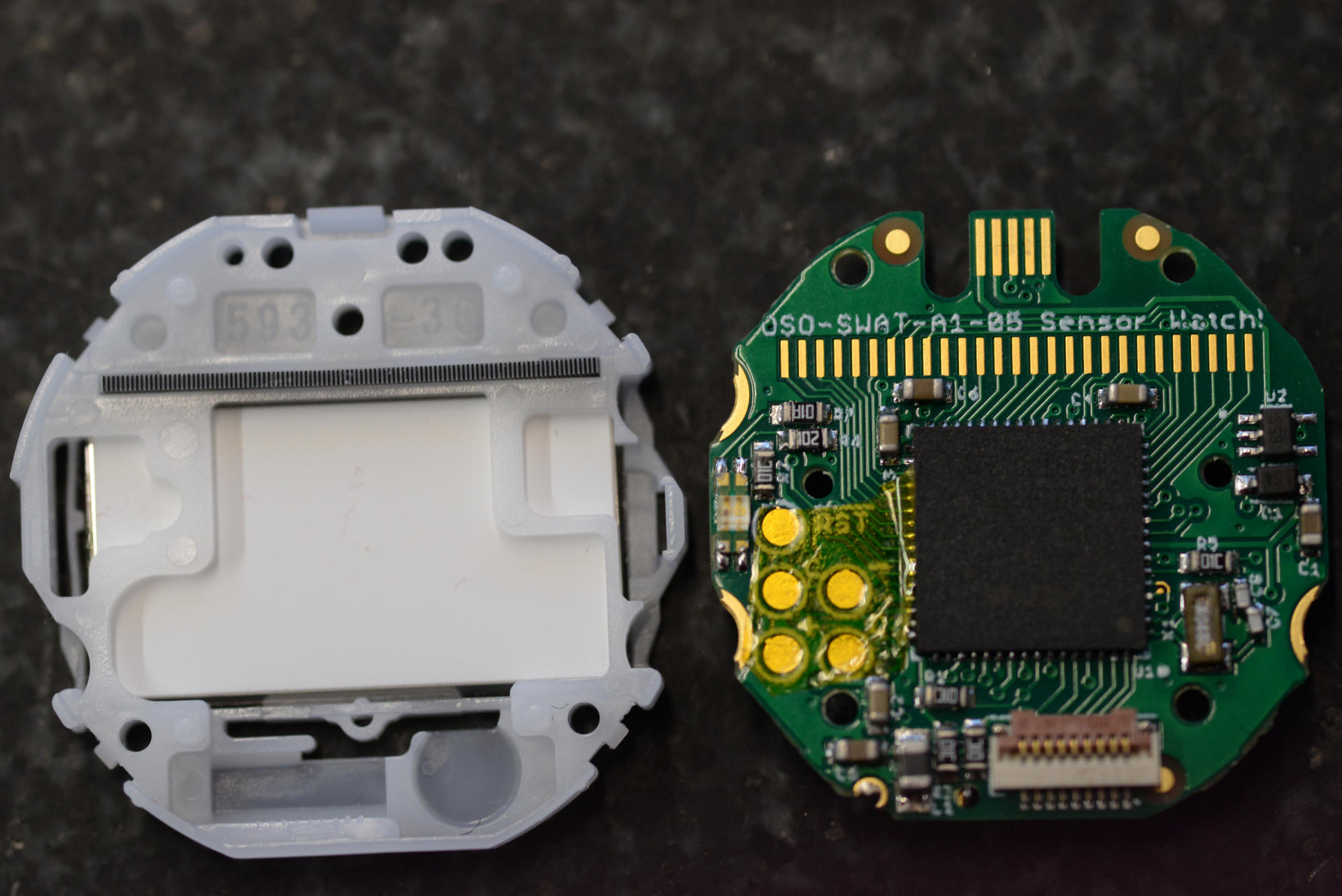
Did I mention, that #SensorWatchPro is pretty cool? With the totp_lfs_face #complication, I now have #TOTP #2FA on my #wristWatch, and it's not even a #smartwatch. https://www.sensorwatch.net/ Thanks, @joeycastillo@mastodon.social! (I use it only for non-critical logins, because access to the secrets is too easy with physical access to the device. E.g. NOT for #salsa #debian org.)
0
0
0
0
:haacknet: Haack's Networking :haacknet: ✍️ We would like to introduce everyone to our latest addition to the #pubglug PubGLUG community offerings. Ente #E2EE encrypted photos, files, and secrets is now live for testing. All users get 10GB upon sign up, but/and more is available upon request (DMs). The technical setup notes are here: 🔗 https://tech.haacksnetworking.org/2026/09/21/ente/ 💡 The instance link is here: 🔗 https://gnulinux.pics 📜 We are in testing right now and there will definitely be bugs and/or other issues that need addressing. Please let us know in replies, DMs, and/or hit us on Matrix or DC. For now, registration is open - if it proves to be a problem we will close it. Until then, happy hacking! #ente #sysadmin #selfhosted #caddy #debian #freesoftware #floss #opensource
2
0
4
0
Has anyone used Devuan? I am wondering how active development is since I am thinking about running Debian for my new server thing on one of my desktops. Issue with Debian is they use systemd by default and starting to try to move away from it. The official site: https://www.devuan.org/ #linux #debian #devuan #systemdlessdebian
0
1
1
0
Ich möchte gerne verstehen warum meine Uhrzeit bei Debian 2h vorgeht. von @waldstepper hab ich https://linux.waldstepper.de/debian-die-uhrzeit-aktuell-halten/ gemacht, ohne Erfolg. immer noch 2h im Vorraus. Tag stimmt. #Debian #Uhrzeit
Quoting
Debian: Die Uhrzeit aktuell halten Mein Debian zeigt seit einigen Tagen eine falsche Uhrzeit an. Ich habe nun das Paket ntpsec per Synaptic installiert, dabei wird das Paket python3-ntp als Abhängigkeit mitgezogen. Die Konfiguration liegt unter /etc/ntpsec/ntp.conf Hier habe ich nichts verändert. Mein Debian verwendet nun die aktuelle Uhrzeit.
Open quoted post
3
1
1
0
Inside PH4NTXM: #31 Firewall Supervision A firewall can be correct at boot and different five minutes later. PH4NTXM's normal-mode firewall guard polls the active ruleset every two seconds and compares its fingerprint with the expected state. Source rules are integrity-checked and syntax-checked before application, including the required NFQUEUE arrangement and disabled bypass behavior. A detected mismatch removes readiness and activates emergency Lockdown before restoration. Readiness returns after successful verification. This is ongoing, periodic supervision of the expected policy, giving Boot Pilot and Health a current protection signal instead of a one-time startup assumption. #ph4ntxm #linux #debian #os #live #privacy #security #opsec #infosec #research #tech #technology
1
0
5
0
Inside PH4NTXM: #29 System Ηardening Protection services need boundaries of their own. PH4NTXM combines selected kernel restrictions with component-specific systemd controls. The native packet worker, for example, uses a restricted capability set, protected system paths, limited address families, disabled core dumps, and a watchdog. The configuration constrains what individual services can access and exposes failures through their startup or runtime checks. The live operator still has passwordless sudo, so administrative access remains a trust boundary. Hardening reduces available interfaces within that model. Ιt does not survive a fully compromised kernel by assumption. #ph4ntxm #linux #debian #os #live #privacy #security #opsec #infosec #research #tech #technology
0
0
4
0
Inside PH4NTXM: #27 Network Drift Packet timing can change throughout a session. PH4NTXM's Network Drift uses netem to vary delay, jitter, and loss on qualifying Linux/Windows default-route interfaces. Profiles update every 20–59 seconds, with separate caps for wireless jitter and loss. Small duplication and reordering settings are also applied. Recognized tunnel, container, bridge, loopback, and ghost interfaces are skipped. This feature deliberately changes network behavior, so latency and throughput tradeoffs are real. Lonewolf does not apply this local shaping. Ιts network path follows Tor. #ph4ntxm #linux #debian #os #live #privacy #security #opsec #infosec #research #tech #technology
0
0
4
0
I realized on Tuesday that it’s been slightly over a year since I gave up Windows on my daily driver PC which I sit at for 8-12 hours a day. Sure doesn’t seem like it’s been over a year. I’d really like to say I’m a lot smarter in the year of being a Linux and FOSS evangelist but I don’t think I am. I have learned a little bit, though 🤷🏻‍♂️ You don’t want to read this, but AI chat have helped a lot w/ my dumb newbie questions. Open LLMs if that’s any consolation 🤷🏻‍♂️ #FOSS #Linux #Debian #Ubuntu #LinuxMint #AIshit #MicroSlop
9
1
1
0