Elektrine
Log in Register
Paige Chat Timeline Gallery Friends Email Drive DNS Private DNS Domains VPN Kairo Nerve
Remote

Swift Dev Journal

@swiftdevjournal@mastodon.world
mastodon 4.7.3
  • Open on mastodon.world

I develop Mac and iOS apps (Phel, Bartleby, AM Pages) in Swift using SwiftUI and AppKit. I also write about app development in Swift at Swift Dev Journal.

936 Followers
468 Following
19 Posts
Joined November 17, 2022
Website:
https://www.swiftdevjournal.com
Open post
Swift Dev Journal @swiftdevjournal@mastodon.world
· 3w ago
Do you want to quickly find the slowest spots in your iOS and Mac app code? If so, the following article shows how to use the Top Functions mode in Instruments to quickly find the slow spots: https://swiftdevjournal.com/posts/top-functions/ #Xcode
swiftdevjournal.com

Using Top Functions Mode in Instruments to Quickly Find the Slowest Code · Swift Dev Journal

1
0
1
0
Open post
Swift Dev Journal @swiftdevjournal@mastodon.world
· 10mo ago
Boosted by @flargh@mastodon.social
Do you get frustrated when you look for Mac development learning material and find only books and articles for iOS? If so, check out the following list of Mac development resources: https://swiftdevjournal.com/resources-for-learning-mac-development/ #MacDev
Swift Dev Journal

Resources for Learning Mac Development

Last update: December 2025 I’ve seen a lot of questions from people on Reddit and Slack looking for resources on Mac development in Swift. Compared to iOS development there are relatively few resources for learning to write Mac apps in Swift. I’ve collected what I found and am sharing with you. Books and Courses The book Hacking with macOS teaches Mac development by building 18 projects. TrozWare publishes the book macOS by Tutorials, where you build two SwiftUI apps and a menu bar app with AppK

40
5
21
1
Open post
Swift Dev Journal @swiftdevjournal@mastodon.world
· 6mo ago

The following article shows a way to create an infinite scroll view in SwiftUI:

https://livsycode.com/swiftui/infinite-scrollview-in-swiftui/

#SwiftUI

Infinite ScrollView in SwiftUI → Livsy Code
Livsy Code → Learn Swift the smart way

Infinite ScrollView in SwiftUI → Livsy Code

Greetings, traveler! Some UI patterns expect a scroll view that never reaches an end. Think of a “featured” carousel on a storefront, a ticker of recent items, a carousel of songs in your player, or a background strip of logos in a landing screen. In these cases, the user should be able to keep swiping

3
0
2
0
Open post
Swift Dev Journal @swiftdevjournal@mastodon.world
· 6mo ago

The following article provides a guide to debugging universal links in iOS apps:

https://bugfender.com/blog/ios-universal-links/

#iOSDev

iOS Universal Links: Setup, Testing and Debugging Guide
bugfender.com

iOS Universal Links: Setup, Testing and Debugging Guide

Debugging iOS Universal Links can be trickier than it seems on the surface. Several layers have to work perfectly, and

2
0
4
0
Open post
Swift Dev Journal @swiftdevjournal@mastodon.world
· 7mo ago

The following article explains why an Observable class's init runs multiple times in SwiftUI:

https://livsycode.com/swiftui/why-your-observable-class-init-runs-multiple-times-in-swiftui/

#SwiftUI

Why Your @Observable Class init() Runs Multiple Times in SwiftUI → Livsy Code
Livsy Code → Learn Swift the smart way

Why Your @Observable Class init() Runs Multiple Times in SwiftUI → Livsy Code

Greetings, traveler! SwiftUI encourages a lightweight view layer. Views are value types, rebuilt frequently, and expected to be cheap. This mental model becomes tricky when you start storing reference types in @State, especially after adopting the Observation framework (@Observable). Note By the way, SwiftUI’s @State is now a macro, which addresses some points raised in

2
0
2
0
Open post
Swift Dev Journal @swiftdevjournal@mastodon.world
· 7mo ago

The following article shows a process to create SwiftUI animations:

https://www.swiftdifferently.com/blog/swiftui/swiftui-animation-with-example

#SwiftUI

The 4-Step Process I Use to Create SwiftUI Animations
SwiftDifferently

The 4-Step Process I Use to Create SwiftUI Animations

Stop throwing .animation() modifiers everywhere and hoping for the best. Here's the systematic process I use to build polished animations that actually work.

2
0
0
0
Open post
Swift Dev Journal @swiftdevjournal@mastodon.world
· 9mo ago
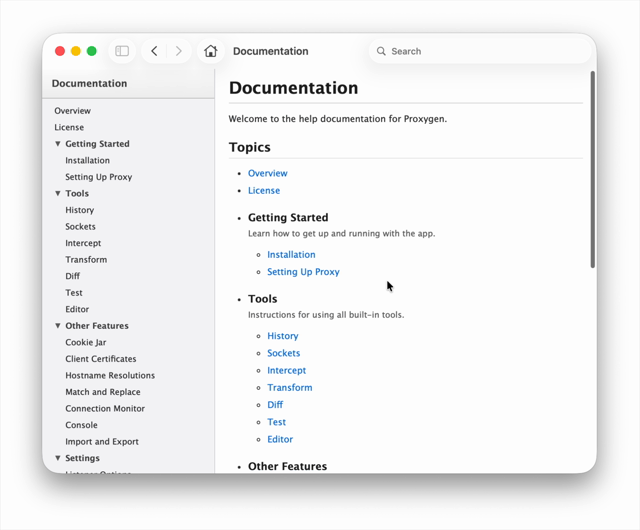
If you're looking for a tool to create help books for Mac apps, check out the GitHub page. https://infosec.exchange/@pasi/115886959182785860
Pasi Salenius (@pasi@infosec.exchange)
Infosec Exchange

Pasi Salenius (@pasi@infosec.exchange)

Attached: 1 image I’m happy enough with the HTML help bundles generated by my HelpBooks tool. The table of contents in the HTML sidebar is keyboard navigable, resizable and allows collapsing sections. Already added this to my dev Proxygen app and it’s nice. It’s all offline. The “Mavericks” theme pictured in the video is the best but there’s also “Modern” and “Tiger”. None of the toolbar items work (back/forward navigation, home, search) but that’s okay I think. https://github.com/PasiSaleni

2
0
1
0
Open post
Swift Dev Journal @swiftdevjournal@mastodon.world
· 6mo ago

Macshot is a cool tool for developers who need to take screenshots and add things like arrows to the picture. https://graphics.social/@metin/116334660926436408

Graphics.social

Metin Seven (@metin@graphics.social)

Just started using Macshot, a free, open source MacOS screen capture and editing tool. I quite like it… https://github.com/sw33tLie/macshot #screenshot #ScreenCapture #editor #app #apps #tools #software #tech #technology #apple #Mac #macOS #tip #tips #FreeSoftware #free #FOSS #OpenSource

1
0
1
0
Open post
Swift Dev Journal @swiftdevjournal@mastodon.world
· 7mo ago

Wondering how long your app takes to launch? The following article shows how to use Instruments to measure your app's launch time:

https://swiftdevjournal.com/posts/measure-app-launch-time/

#Xcode

Swift Dev Journal

Measure App Launch Time with Instruments

Take the following steps to measure your app’s launch time with Instruments: Press Cmd-I or choose Product > Profile to profile your app. Select the App Launch template when Instruments launches. Click the Choose button. Click the Record button to start profiling. Select the item with the name of your app from the timeline pane. Press Cmd-4 to open the App Lifecycle section. The App Lifecycle section lists the app’s launch steps and how long each step took.

1
0
0
0
Open post
Swift Dev Journal @swiftdevjournal@mastodon.world
· 7mo ago

I tried using SwiftUI's new support for rich text in TextEditor. It's nowhere near a replacement for NSTextView on Mac.

You have to open the ruler from the Format menu to show rich text formatting controls. The controls are limited compared to NSTextView's inspector.

The worst issue is sidebars block the left side of the formatting controls. You have to hide the sidebar to apply a paragraph style to your text.

#SwiftUI #MacDev

1
0
1
0
Open post
Swift Dev Journal @swiftdevjournal@mastodon.world
· 7mo ago

The following article shows how to add an Open Recent menu to a SwiftUI app:

https://swiftdevjournal.com/posts/open-recent-menu/

#SwiftUI

Swift Dev Journal

Add an Open Recent Menu to a SwiftUI app

Why would you need to add an Open Recent menu? The most common reason is you created an app that doesn’t use the document architecture, and you want a way for your app’s users to access recent items. Adding an Open Recent menu requires you to do the following things: Use the NSDocumentController class to track recent items. Add an @Observable class to hold the recent items so SwiftUI can update the Open Recent menu when its contents change. Using NSDocumentController to track recent items The na

0
0
0
0
Open post
Swift Dev Journal @swiftdevjournal@mastodon.world
· 7mo ago

The following article shows how to use the new SwiftUI instrument to find the views in your app that update the most:

https://swiftdevjournal.com/posts/swiftui-frequent-view-updates/

#SwiftUI #Xcode

Swift Dev Journal

Find the SwiftUI Views that Update the Most Using Instruments

When profiling a SwiftUI app with Instruments, one thing you want to know is what views update the most. If a view updates more than you expect, you want to know what causes the updates. In this article you will learn how to use the SwiftUI instrument to find the views in your app that update the most and find what triggers view updates. This article uses the new SwiftUI instrument Apple added in Xcode 26. If you are using an earlier version of Xcode, read the following article:

0
0
0
0
Open post
Swift Dev Journal @swiftdevjournal@mastodon.world
· 7mo ago

The following article shows how to use MapKit to create maps in SwiftUI apps:

https://www.createwithswift.com/creating-maps-in-swiftui-apps-with-mapkit/

#SwiftUI

Creating Maps in SwiftUI apps with MapKit
Create with Swift

Creating Maps in SwiftUI apps with MapKit

Learn how to integrate Maps using MapKit in modern iOS applications.

0
0
1
0
Open post
Swift Dev Journal @swiftdevjournal@mastodon.world
· 6mo ago

The following article shows how to use Dynamic Type to scale images in iOS apps:

https://blog.ambi.se/scaledMetrics

#iOSDev

blog.ambi.se

Scale your images with Dynamic Type

0
0
1
0
Open post
Swift Dev Journal @swiftdevjournal@mastodon.world
· 6mo ago

The following article shows techniques for highlighting the selected menu item in SwiftUI Mac apps:

https://serialcoder.dev/text-tutorials/macos-tutorials/indicating-selection-in-macos-menus-using-swiftui/

#SwiftUI #MacDev

Indicating Selection in macOS Menus Using SwiftUI
SerialCoder.dev

Indicating Selection in macOS Menus Using SwiftUI

Explore practical ways to indicate selection in macOS menus using SwiftUI, including buttons, pickers, and toggles for both toolbar and main menu.

0
0
2
0
Open post
Swift Dev Journal @swiftdevjournal@mastodon.world
· 6mo ago

Wondering how long your app takes to launch? The following article shows how to measure your app's launch time with Instruments:

https://swiftdevjournal.com/posts/measure-app-launch-time/

#Xcode

Swift Dev Journal

Measure App Launch Time with Instruments

Take the following steps to measure your app’s launch time with Instruments: Press Cmd-I or choose Product > Profile to profile your app. Select the App Launch template when Instruments launches. Click the Choose button. Click the Record button to start profiling. Select the item with the name of your app from the timeline pane. Press Cmd-4 to open the App Lifecycle section. The App Lifecycle section lists the app’s launch steps and how long each step took.

0
0
1
0
Open post
Swift Dev Journal @swiftdevjournal@mastodon.world
· 6mo ago

If you are seeing a popup button at the top of the navigator and inspector views in Xcode instead of a segmented control with buttons for each navigator/inspector, make the navigator and/or inspector view wider. The segmented control turns into a popup button when the view is too narrow.

#Xcode

0
0
1
0
Open post
Swift Dev Journal @swiftdevjournal@mastodon.world
· 6mo ago

If you’re interested in learning the Swift programming language and looking for a guide, the following guide provides a nice introduction to the language:


https://codewithchris.com/learn-swift/

#Swift

Swift Tutorial 2026: Learn Swift From Absolute Zero : CodeWithChris
CodeWithChris

Swift Tutorial 2026: Learn Swift From Absolute Zero : CodeWithChris

Follow this free Swift tutorial to learn Swift programming from absolute zero, with 30-minute lessons, runnable code, challenges, and AI prompts.

0
0
1
0
Open post
Swift Dev Journal @swiftdevjournal@mastodon.world
· 10mo ago
Replying to
@ctietze@mastodon.social I added links to your book and blog to the list.
0
0
0
0
Back
313k7r1n3
Elektrine

Tor hidden service

elekhj7afj4qnrr4yd3bkzslsyo5jgfxw3orgjkhlcxifueodybyiiad.onion

I2P eepsite

j6b6cyk6gjmepjih7jjadxgxvvf3lzzujljuu2v4biemzpg3naya.b32.i2p

Platform

  • Email
  • Chat
  • Timeline
  • VPN
  • DNS

Company

  • About
  • Pricing
  • Contact
  • FAQ
  • Lite (no JS)

Legal

  • Terms of Service
  • Privacy Policy
  • Transparency Report
  • Report Abuse
  • Warrant Canary
  • VPN Policy

Support

  • support@elektrine.com
  • Report Security Issue
Mail client setup IMAP mail.elektrine.com:993 POP3 mail.elektrine.com:995 SMTP mail.elektrine.com:465
© 2026 Elektrine. All rights reserved. Server: 11:20:24 UTC